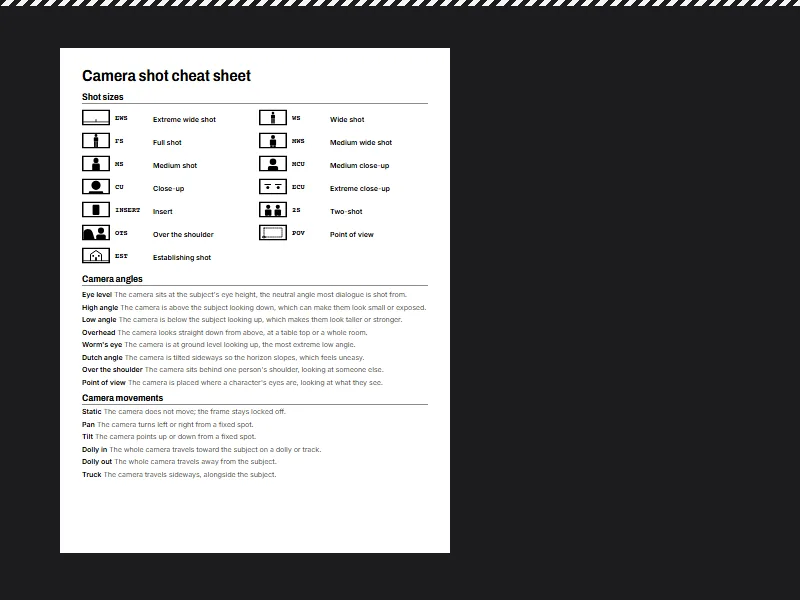
Camera Shot List: Sizes, Angles and Movements
Camera shots are named three ways: by size, meaning how much of the subject fills the frame, from extreme wide to extreme close-up; by angle, meaning where the camera sits, such as eye level, high or low; and by movement, such as a pan, tilt or dolly. A shot list names all three for every shot.
Types of camera shots
Every row on a shot list answers three questions at once: how much of the subject is in frame, where the camera sits and whether it moves. Two more families of names describe what a shot frames and the job it does in the edit. Crews mix all five in conversation, so it helps to know which question each word answers.
| Family | Answers the question | Examples |
|---|---|---|
| Sizes | How much of the subject is in frame? | Extreme wide, wide, medium, close-up |
| Angles | Where is the camera? | Eye level, high, low, Dutch |
| Movements | Does the camera move, and how? | Pan, tilt, dolly, push in |
| Shots named for what they frame | What is in the frame? | Insert, two-shot, over the shoulder, point of view, establishing |
| Shots named for their job in the edit | What does it do in the cut? | Master, single, reaction, cutaway, b-roll |
A shot list needs a size, an angle and a movement on every row. To see the frames before the shoot, sketch them on a storyboard template.
Shot sizes
Size is how much of the subject fills the frame. The drawings show how much of a person each one holds, and the codes are the ones the maker and the Excel dropdowns use.
From wide to close
- EWSExtreme wide shot
The person is small against the place, so the frame shows scale, distance and where we are. Open a sequence or show how alone someone is.
- WSWide shot
The whole person from head to feet with room around them, so everyone in the scene can be placed. Use it as the master for a scene.
- FSFull shot
Head to toe, with the body filling the height of the frame. Show body language, costume and movement.
- MWSMedium wide shot
From about mid-thigh up, also called a cowboy shot or American shot. Cover two or three people standing and talking.
- MSMedium shot
From the waist up, close enough for faces while hands and gestures stay in view. The everyday shot for dialogue and action.
- MCUMedium close-up
From the chest up, close enough to read the face with the shoulders still in frame. The standard single in a dialogue scene.
- CUClose-up
Head and shoulders filling the frame. Use it for reactions and the lines that matter most.
- ECUExtreme close-up
One detail, such as the eyes or the mouth, fills the frame. Build tension or show a small reveal.
Shots named for what they frame
- INSERTInsert
A close shot of an object or a detail, such as a letter, a phone screen or a key in a lock. Show the audience what a character sees or handles.
- 2STwo-shot
Two people in one frame, usually from the waist up. Play a conversation without cutting between faces.
- OTSOver the shoulder
One person seen past the shoulder and head of another person in the foreground. Cover each side of a conversation and keep both people connected.
- POVPoint of view
The frame shows what a character sees, from their eye line. Put the audience behind a character's eyes.
- ESTEstablishing shot
A wide view of a building or place that tells the audience where the next scene happens. Open a new location, often without sound.
Camera angles
The angle is where the camera sits in relation to the subject, and it changes how the audience feels about them. Over the shoulder and point of view appear twice on this page, as sizes and as angles, because crews use the words both ways.
- Eye level
The camera sits at the subject's eye height, the neutral angle most dialogue is shot from. Use it for: most dialogue, and anything that should feel neutral.
- High angle
The camera is above the subject looking down, which can make them look small or exposed. Use it for: a character who feels small, trapped or watched.
- Low angle
The camera is below the subject looking up, which makes them look taller or stronger. Use it for: a character who holds the power in the scene.
- Overhead
The camera looks straight down from above, at a table top or a whole room. Use it for: table tops, maps, hands at work and choreography.
- Worm's eye
The camera is at ground level looking up, the most extreme low angle. Use it for: tall buildings and big reveals.
- Dutch angle
The camera is tilted sideways so the horizon slopes, which feels uneasy. Use it for: unease, dreams and a world off balance, used sparingly.
- Over the shoulder
The camera sits behind one person's shoulder, looking at someone else. Use it for: conversations, so both people stay in the scene.
- Point of view
The camera is placed where a character's eyes are, looking at what they see. Use it for: putting the audience in a character's place.
Camera movements
Movement words get mixed up more than any others, so here are the pairs that matter. A pan turns the camera on the spot; a truck moves the whole camera sideways. A dolly moves the camera toward or away from the subject; a zoom changes the lens and leaves the camera where it is, so the perspective does not change. A push in is a slow, short dolly in. A tracking shot follows the subject on a dolly, a slider, a gimbal or a vehicle. Gimbals and body-worn stabilizers float the camera so it glides, and a crane or a jib lifts it.
- Static
The camera does not move; the frame stays locked off. Use it for: dialogue, comic timing and anything that should feel calm.
- Pan
The camera turns left or right from a fixed spot. Use it for: following someone across a room or revealing a space.
- Tilt
The camera points up or down from a fixed spot. Use it for: revealing height, from shoes to face or from base to roof.
- Dolly in
The whole camera travels toward the subject on a dolly or track. Use it for: drawing the audience closer as tension rises.
- Dolly out
The whole camera travels away from the subject. Use it for: leaving a character alone or revealing where they are.
- Truck
The camera travels sideways, alongside the subject. Use it for: walking and talking, or sliding past a row of things.
- Pedestal
The camera rises or lowers straight up or down without tilting. Use it for: rising to an eye line or over an object.
- Zoom
The lens changes focal length while the camera stays put, so the subject grows or shrinks. Use it for: a quick emphasis or a documentary feel.
- Handheld
The operator carries the camera, so the frame breathes and follows the action. Use it for: energy, urgency and a documentary feel.
- Gimbal
A stabilized rig carried by hand that glides with the subject. Use it for: smooth moves through rooms without laying a track.
- Crane
The camera rises, falls or sweeps on a jib or crane arm. Use it for: openings and endings that rise over a scene.
- Drone
An aerial move from a drone, over land, water or buildings. Use it for: landscapes, scale and establishing a location.
- Push in
A slow move toward the subject, often on a slider, that tightens the frame and the tension. Use it for: the moment a character realizes something.
- Whip pan
A pan so fast the image blurs, often used to cut between two moments. Use it for: fast transitions and sudden reactions.
Focus and editing terms that go with them
These words turn up in the notes column and in conversations with the editor.
- Rack focus
- Shifting focus from one subject to another during the shot, so the audience looks where you want.
- Shallow focus
- Only a thin slice of the picture is sharp, usually the eyes, and the background goes soft.
- Deep focus
- Near and far are both sharp, so the audience can choose where to look.
- Master
- One shot that plays the whole scene, usually wide, which the closer shots cut into.
- Single
- A shot of one person, usually a medium close-up or a close-up.
- Reverse
- The shot from the opposite side, such as the other half of a conversation.
- Reaction
- A shot of someone listening or responding rather than talking.
- Cutaway
- A shot of something outside the main action, such as a clock or the street, used to bridge a cut.
- Insert or cutaway
- An insert shows a detail inside the action, like the letter in her hand. A cutaway leaves the action for a moment.
- B-roll
- Extra footage laid over speech or narration, common in interviews and documentaries.
- Coverage
- All the shots of a scene taken together, from the master to the inserts.
- The 180-degree rule
- Keep the camera on one side of the line between two people, so they keep facing the same way on screen.
Camera shot cheat sheet
The whole vocabulary on one table, with the code you write in the shot list. The same entries print on one page as a PDF.
| Code | Name | What it shows | Use it for |
|---|---|---|---|
| Shot sizes | |||
| EWS | Extreme wide shot | The person is small against the place, so the frame shows scale, distance and where we are. | Open a sequence or show how alone someone is. |
| WS | Wide shot | The whole person from head to feet with room around them, so everyone in the scene can be placed. | Use it as the master for a scene. |
| FS | Full shot | Head to toe, with the body filling the height of the frame. | Show body language, costume and movement. |
| MWS | Medium wide shot | From about mid-thigh up, also called a cowboy shot or American shot. | Cover two or three people standing and talking. |
| MS | Medium shot | From the waist up, close enough for faces while hands and gestures stay in view. | The everyday shot for dialogue and action. |
| MCU | Medium close-up | From the chest up, close enough to read the face with the shoulders still in frame. | The standard single in a dialogue scene. |
| CU | Close-up | Head and shoulders filling the frame. | Use it for reactions and the lines that matter most. |
| ECU | Extreme close-up | One detail, such as the eyes or the mouth, fills the frame. | Build tension or show a small reveal. |
| INSERT | Insert | A close shot of an object or a detail, such as a letter, a phone screen or a key in a lock. | Show the audience what a character sees or handles. |
| 2S | Two-shot | Two people in one frame, usually from the waist up. | Play a conversation without cutting between faces. |
| OTS | Over the shoulder | One person seen past the shoulder and head of another person in the foreground. | Cover each side of a conversation and keep both people connected. |
| POV | Point of view | The frame shows what a character sees, from their eye line. | Put the audience behind a character's eyes. |
| EST | Establishing shot | A wide view of a building or place that tells the audience where the next scene happens. | Open a new location, often without sound. |
| Camera angles | |||
| Eye | Eye level | The camera sits at the subject's eye height, the neutral angle most dialogue is shot from. | Most dialogue, and anything that should feel neutral. |
| High | High angle | The camera is above the subject looking down, which can make them look small or exposed. | A character who feels small, trapped or watched. |
| Low | Low angle | The camera is below the subject looking up, which makes them look taller or stronger. | A character who holds the power in the scene. |
| Overhead | Overhead | The camera looks straight down from above, at a table top or a whole room. | Table tops, maps, hands at work and choreography. |
| Worm | Worm's eye | The camera is at ground level looking up, the most extreme low angle. | Tall buildings and big reveals. |
| Dutch | Dutch angle | The camera is tilted sideways so the horizon slopes, which feels uneasy. | Unease, dreams and a world off balance, used sparingly. |
| OTS | Over the shoulder | The camera sits behind one person's shoulder, looking at someone else. | Conversations, so both people stay in the scene. |
| POV | Point of view | The camera is placed where a character's eyes are, looking at what they see. | Putting the audience in a character's place. |
| Camera movements | |||
| Static | Static | The camera does not move; the frame stays locked off. | Dialogue, comic timing and anything that should feel calm. |
| Pan | Pan | The camera turns left or right from a fixed spot. | Following someone across a room or revealing a space. |
| Tilt | Tilt | The camera points up or down from a fixed spot. | Revealing height, from shoes to face or from base to roof. |
| Dolly in | Dolly in | The whole camera travels toward the subject on a dolly or track. | Drawing the audience closer as tension rises. |
| Dolly out | Dolly out | The whole camera travels away from the subject. | Leaving a character alone or revealing where they are. |
| Truck | Truck | The camera travels sideways, alongside the subject. | Walking and talking, or sliding past a row of things. |
| Pedestal | Pedestal | The camera rises or lowers straight up or down without tilting. | Rising to an eye line or over an object. |
| Zoom | Zoom | The lens changes focal length while the camera stays put, so the subject grows or shrinks. | A quick emphasis or a documentary feel. |
| Handheld | Handheld | The operator carries the camera, so the frame breathes and follows the action. | Energy, urgency and a documentary feel. |
| Gimbal | Gimbal | A stabilized rig carried by hand that glides with the subject. | Smooth moves through rooms without laying a track. |
| Crane | Crane | The camera rises, falls or sweeps on a jib or crane arm. | Openings and endings that rise over a scene. |
| Drone | Drone | An aerial move from a drone, over land, water or buildings. | Landscapes, scale and establishing a location. |
| Push in | Push in | A slow move toward the subject, often on a slider, that tightens the frame and the tension. | The moment a character realizes something. |
| Whip pan | Whip pan | A pan so fast the image blurs, often used to cut between two moments. | Fast transitions and sudden reactions. |
How to use shot types in a shot list
New to the format? Start with what is a shot list. Then fill the size, angle and movement for every row. The codes on this page match the maker and the Excel dropdowns, so a list built with them stays consistent from the first draft to the call sheet.
A few rules hold for most scenes:
- Open a scene wide, so the audience knows where they are.
- Cover both sides of a conversation at matching sizes, so the cuts feel even.
- Save the tightest size for the moment that matters most.
- Give every insert a reason: a detail the story needs, not a pretty shot.
For the full method, read how to make a shot list, and to see these codes in finished lists, look through the shot list examples.
Paste a scene, get the shots
Paste a scene into the shot list template and get every shot, ready to edit and export.
Open the shot list templateQuestions
What are the main types of camera shots?
The main shot sizes are the extreme wide, wide, full, medium wide, medium, medium close-up, close-up and extreme close-up. Around them sit the shots named for what they frame: establishing, two-shot, over the shoulder, point of view and insert. Angles and movements then describe where the camera sits and how it moves.
What is the difference between a medium shot and a close-up?
A medium shot frames a person from about the waist up, so you see gestures and some of the room. A close-up fills the frame with the face, so every small change of expression reads. Directors often cover a conversation in medium shots and move to close-ups for the moment that matters most.
What is a cowboy shot?
A cowboy shot is a medium wide shot framed from about mid-thigh up. The name comes from westerns, where it kept a gunfighter's holster in frame. It is also called an American shot. It shows body language and a little of the setting, and in the maker and the templates it is coded MWS.
What is an establishing shot?
An establishing shot opens a scene by showing where it takes place, usually a wide exterior of the building, street or landscape. It tells the audience where and often when they are before the scene cuts closer. It is usually shot without sound, which is why shot lists mark it MOS.
What are the types of camera angles?
Eye level is the neutral default. A high angle looks down on the subject and can make it seem smaller; a low angle looks up and can make it seem stronger. Overhead looks straight down, a worm's-eye view looks up from the ground, a Dutch angle tilts the frame, and over-the-shoulder and point-of-view shots place the camera with a character.
What is the difference between a dolly shot and a zoom?
A dolly moves the whole camera toward or away from the subject, so the background shifts and the space feels real. A zoom keeps the camera still and changes the lens's focal length, so the picture is simply magnified and the perspective does not change. A slow push in on a slider gives a dolly feel on a small budget.
What is a Dutch angle?
A Dutch angle, also called a canted angle, tilts the camera sideways so the horizon runs at a slant. It makes a scene feel uneasy or off balance, which is why it shows up in thrillers and dream sequences. Use it sparingly: a whole scene of tilted frames tires the eye quickly.
Is there a printable camera shot cheat sheet?
Yes. The cheat sheet PDF on this page lists every shot size, angle and movement with its code and a one-line meaning, on a single page you can print for set or class. It uses the same names and codes as the maker and the Excel dropdowns, so the sheet and your shot list always match.