Shooting Schedule Template
Download the schedule for Excel or PDF, or build a timed shoot day from your shot list. Free, no sign-up.
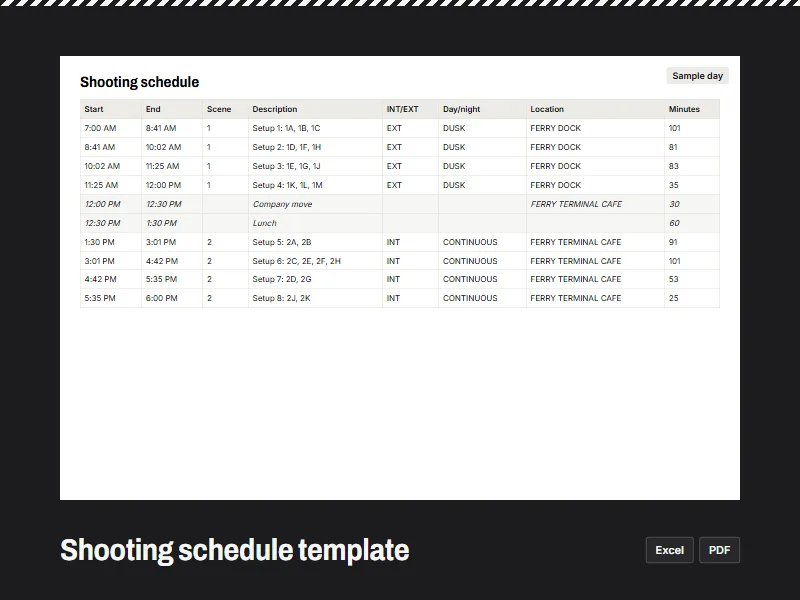
Shooting schedule template
Scenes by day with Start and End times worked out by formula, plus a sample day. Free, no sign-up.
What is in this template
The template has one row per scene or setup and these thirteen columns. Here they are filled with a sample day: the example scene from the home page, broken into setups by the shot list maker, starting at 7:00 AM with a company move and lunch.
| Day | Date | Start | End | Scene | Description | INT or EXT | Day or night | Location | Cast | Pages (eighths) | Minutes | Notes | |
|---|---|---|---|---|---|---|---|---|---|---|---|---|---|
| 1 | 7:00 AM | 8:41 AM | 1 | Setup 1: 1A, 1B, 1C | EXT | DUSK | FERRY DOCK | EMMET, NOOR | 4 | 101 | Day 1, EXT, DUSK, FERRY DOCK | ||
| 1 | 8:41 AM | 10:02 AM | 1 | Setup 2: 1D, 1F, 1H | EXT | DUSK | FERRY DOCK | EMMET, NOOR | 81 | Day 1, EXT, DUSK, FERRY DOCK | |||
| 1 | 10:02 AM | 11:25 AM | 1 | Setup 3: 1E, 1G, 1J | EXT | DUSK | FERRY DOCK | EMMET, NOOR | 83 | Day 1, EXT, DUSK, FERRY DOCK | |||
| 1 | 11:25 AM | 12:00 PM | 1 | Setup 4: 1K, 1L, 1M | EXT | DUSK | FERRY DOCK | EMMET, NOOR | 35 | Day 1, EXT, DUSK, FERRY DOCK | |||
| 1 | 12:00 PM | 12:30 PM | Company move | FERRY TERMINAL CAFE | 30 | Day 1, FERRY TERMINAL CAFE | |||||||
| 1 | 12:30 PM | 1:30 PM | Lunch | 60 | Day 1 | ||||||||
| 1 | 1:30 PM | 3:01 PM | 2 | Setup 5: 2A, 2B | INT | CONTINUOUS | FERRY TERMINAL CAFE | CASHIER, NOOR, EMMET | 4 | 91 | Day 1, INT, CONTINUOUS, FERRY TERMINAL CAFE | ||
| 1 | 3:01 PM | 4:42 PM | 2 | Setup 6: 2C, 2E, 2F, 2H | INT | CONTINUOUS | FERRY TERMINAL CAFE | CASHIER, NOOR, EMMET | 101 | Day 1, INT, CONTINUOUS, FERRY TERMINAL CAFE | |||
| 1 | 4:42 PM | 5:35 PM | 2 | Setup 7: 2D, 2G | INT | CONTINUOUS | FERRY TERMINAL CAFE | CASHIER, NOOR, EMMET | 53 | Day 1, INT, CONTINUOUS, FERRY TERMINAL CAFE | |||
| 1 | 5:35 PM | 6:00 PM | 2 | Setup 8: 2J, 2K | INT | CONTINUOUS | FERRY TERMINAL CAFE | CASHIER, NOOR, EMMET | 25 | Day 1, INT, CONTINUOUS, FERRY TERMINAL CAFE |
In the Excel file, End is a formula: the Start plus that row's minutes. Each Start after the first is the End of the row above, so changing one row's minutes moves every time after it. Type your own crew call over the first Start, and the whole day follows.
Pages go in as eighths, the way assistant directors count them, so a scene of one and three eighths pages is 11. Day and Date tie the rows to the calendar when the shoot runs over several days, and Notes holds anything the day depends on, such as a permit window or an actor who has to leave early.
Build a shoot day from your shot list
The button below takes the list you made with the shot list template maker, which is saved in this browser. It keeps the setups in shooting order, adds up each setup's minutes from your crew call, puts lunch in before any setup that would run past six hours after crew call, so lunch never starts later than the six-hour mark (common practice, not a rule, so check your agreements), adds 30 minutes for each company move and gives you an Excel file whose times recalculate. A long list runs over several shoot days of up to 12 hours each, every day starting at the crew call with its own lunch. You can change the crew call, the lunch timing and the length of a move first.
No list yet? Read how to make a shot list, or open one of the shot list examples, press Use this one, then come back here.
Make a shot list first with the maker on the home page. It is saved in this browser and shows up here.
How to fill in a shooting schedule
- List every scene with its length in eighths of a page.
- Group the scenes by location, so each place is visited once.
- Inside a location, group by day or night and by interior or exterior.
- Then group by cast availability, keeping each actor's days together.
- Put exteriors early in the shoot, with an interior cover set ready in case of weather.
- Add up the minutes for each day, then add lunch and the company moves.
- Leave a buffer at the end of every day.
- Share the schedule, then turn each day into a call sheet template the evening before.
Shooting schedule, production schedule and stripboard
Shooting schedule: the shoot days only, scene by scene, in the order you will film them.
Production schedule: the whole project, from casting and location scouting through the shoot to editing, sound and delivery. Use this template for the shoot block and add rows above and below it for pre-production and post, and it becomes a production schedule template of your own.
Stripboard: one strip per scene, showing its number, location, day or night and cast, moved around a board until the order works. Scheduling software copies the idea on screen, and a spreadsheet sorted by location does the same job for a small shoot.
Plan for weather and company moves
- Keep a cover set: an interior you can shoot if rain stops the exteriors.
- Check sunrise and sunset for every exterior day, and schedule the light you need.
- Give every company move its real cost: packing, driving, parking and setting up again.
- Shoot the hardest scene early in the day, while the crew is fresh.
- If a location only works at one time of day, write that time in Notes and build the rest of the day around it.
Questions
What is a shooting schedule?
A shooting schedule is the plan for every shoot day: which scenes are filmed on which day, in what order, at which location and with which cast. It is built from the script breakdown and the shot list, grouped to cut down company moves, and it is the source for each day's call sheet.
How do you make a shooting schedule?
List every scene with its location, cast, day or night and page count. Group the scenes by location, then by day or night, then by actor availability, and fill each shoot day up to the hours you have, with lunch and company moves added. The Build it from my shot list button does the timing and starts a new day after 12 hours.
What is a stripboard?
A stripboard is the traditional scheduling board: one colored strip per scene, showing its number, location, day or night and cast, arranged in columns by shoot day. Moving strips around shows the best order at a glance. Scheduling software copies the idea on screen, and a spreadsheet sorted by location does the same job for a small shoot.
How many script pages can you shoot in a day?
There is no fixed number. A dialogue scene in one room can move quickly, while a page of action, stunts or crowd work can take a whole day. Schedule by setups instead of pages: count the setups for each scene, estimate their minutes, and see what fits in your hours.
What is the difference between a shooting schedule and a production schedule?
A shooting schedule covers only the shoot days. A production schedule covers the whole project: pre-production tasks such as casting and location scouting, the shoot days, then editing, sound and delivery. This template handles the shoot days; add rows for pre-production and post above and below them to turn it into a full production schedule.
Is there a shooting schedule template for Google Sheets?
Yes. Download the Excel file and open it in Google Sheets, either with File, then Import, or by uploading it to Google Drive. The start and end times keep their formulas, so changing a scene's minutes moves every later time. The PDF version is there for printing and filling by hand.
When should lunch be scheduled on a shoot day?
A common practice is to break for lunch no later than six hours after crew call. The schedule builder here does that by default: it puts lunch before any setup that would run past the six-hour mark. Union agreements, local labor rules and your own contracts can set different limits and penalties, so check them and change the setting to match.