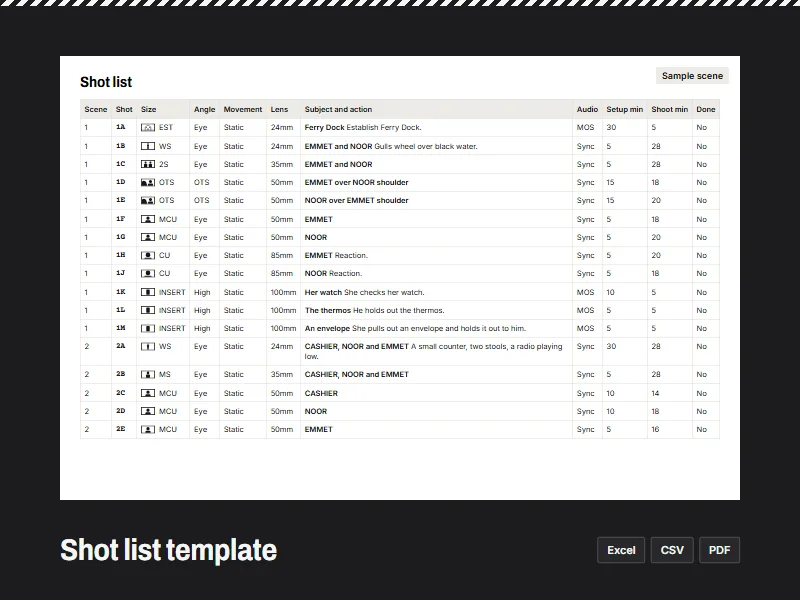
Shot List Template
Paste a scene, get a shot list you can edit, reorder and export. Free, no sign-up.
Download a shot list template
A shot list template is a table with one row per shot and columns for the scene, shot number, size, angle, movement, lens, action and sound. Download a blank one for Excel, Google Sheets, CSV or PDF, or paste your scene into the maker above and get the rows filled in, in shooting order, ready to edit.
-
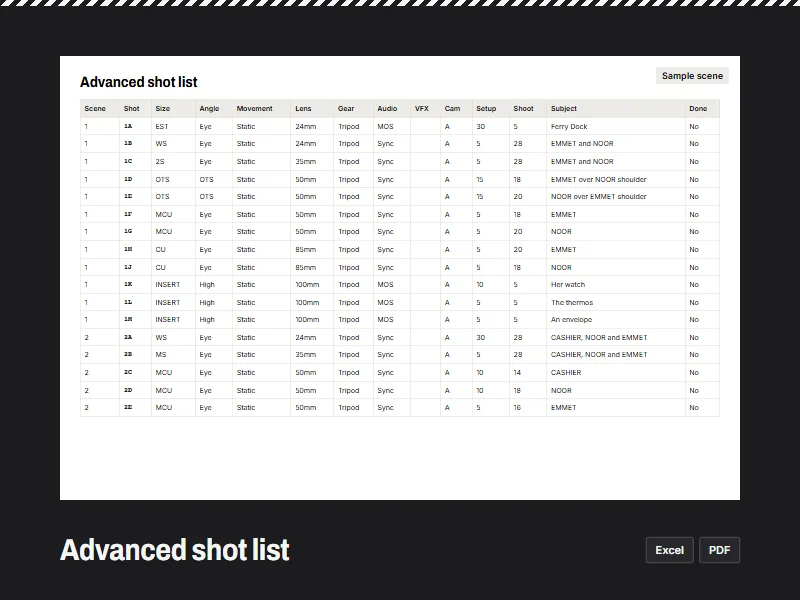
Advanced shot list
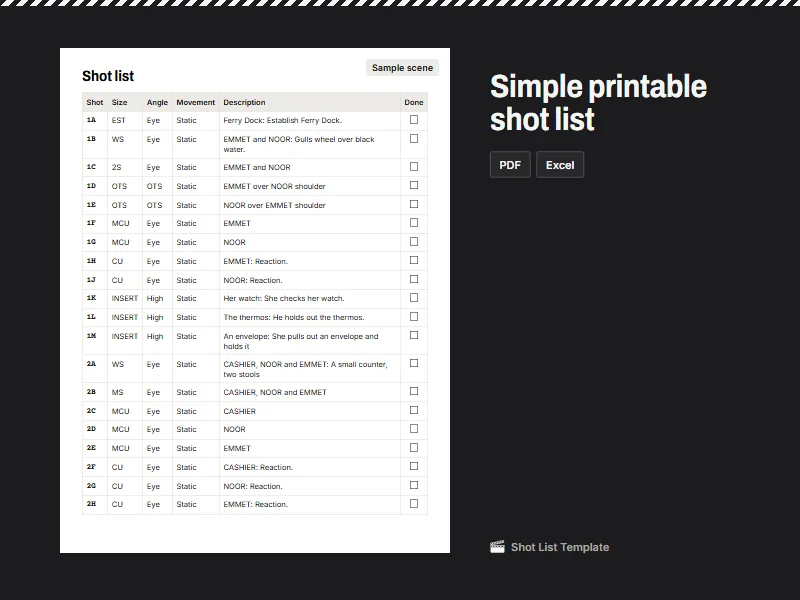
Simple printable shot list
Every file is free, with no sign-up. The Excel version is a film shot list template that also works in Google Sheets, dropdowns and all.
All 8 templatesHow to use the maker
Paste a scene or open a script
Paste one scene or a few, or open a .txt, .fountain, .fdx (Final Draft) or text PDF file. A scanned PDF is a picture of the page and cannot be read, so export the PDF from your writing app instead.
Pick the shoot type and style
Choose what you are shooting, the style of coverage and how many cameras you have. Add the lenses you own and every shot snaps to one of them.
Edit, reorder and export
Edit any cell, add, delete or drag rows, and switch between script order and shooting order. Then download Excel, CSV, Word or PDF, copy the rows for Google Sheets or Notion, or send the list to the storyboard template sheet maker.
The same script always gives the same list, and nothing you paste leaves your browser.
How to fill in each column
The 17 columns the maker fills and every export carries, in order, with examples from the full example below.
| Column | What to write | Example |
|---|---|---|
| Scene | Copy the scene number from the script. | 1 |
| Heading | Copy the scene heading as it is written. | EXT. FERRY DOCK - DUSK |
| Shot | Give each shot the scene number plus a letter. | 1D |
| Size | Pick how much of the subject fills the frame. | WS (wide shot), MCU (medium close-up), OTS (over the shoulder) |
| Angle | Say where the camera sits. | Eye level |
| Movement | Say whether the camera moves, and how. | Static |
| Lens | Note the focal length you plan to use. | 50mm |
| Subject | Name who or what the shot is on. | EMMET and NOOR |
| Action | Describe what happens in frame in a few words. | She checks her watch. |
| Dialogue cue | Copy the first words of the line the shot covers. | "You said seven." |
| Audio | Mark how sound is recorded. | Sync for dialogue, MOS (no sound recorded) for the establishing shot |
| Gear | List what holds or moves the camera. | Tripod |
| Camera | Letter the camera when more than one rolls. | A |
| Setup min | Estimate the minutes to light and set up. | 30 |
| Shoot min | Estimate the minutes for the takes. | 28 |
| Notes | Add anything the crew must know. | Roll through the other lines. |
| Done | Mark it when the shot is filmed. | Yes or No |
Every size, angle and movement name, with a drawing of each size, is on the camera shot list page.
What the maker adds for each shoot type
| Shoot type | Shots the maker adds | Good for |
|---|---|---|
| Narrative scene | An establishing shot for a new exterior, a master, a two-shot, singles and over-the-shoulder pairs for two speakers, a group shot for three or more, prop inserts, and reactions in long scenes. | Short films, features, web series |
| Interview | A wide two-shot, the guest in medium close-up, a profile on a second camera, one listening shot, the hands, and a cutaway idea per question. | Talking heads, testimonials, filmed podcasts |
| Music video | Wide, medium close and close performance shots per section to playback, b-roll from the lyrics, a low-angle hero shot, instrument inserts and a closing wide. | Band and artist videos |
| Commercial (product video) | An opening wide, the problem beats, a product hero close-up, a detail, the product in use and an end packshot, with voice-over on the shots it covers. | Product spots, ads, brand films |
| YouTube video | A talking head per part, a close hook shot, b-roll per part, a screen insert where you name an app or website, and an outro. | Tutorials, vlogs, explainers |
| Documentary | Handheld wide and medium shots of each action beat, an interview setup for each person, establishing shots and detail inserts. | Profiles, observational films |
| Event | The venue, arrivals, a medium shot and a close-up for each run-of-show item (the close-up on a second camera if you have one), the audience, details and a group photo. | Weddings, conferences, live shows |
Four styles change that set. Coverage is the full set above. Minimal keeps a master, a single for each speaker and one insert at most, for a tight day. Handheld puts the camera on the shoulder for everything except the inserts and swaps the over-the-shoulder shots for roaming singles. Cinematic adds a drone establishing shot on daytime exteriors, a slow push-in on each speaker's longest line, slider moves on the inserts and a low-angle master.
The maker never adds a person, a prop or a story beat that is not in your text: subjects and actions come from your own words plus a short list of fixed shot words. For one complete list per shoot type, look through the shot list examples.
A full example
The Last Ferry: two scenes at full coverage
Use it when: two locations, three speakers and a few props: the maker at full coverage. Maker settings: Narrative scene, coverage style, 1 camera.
The scene (82 lines)
EXT. FERRY DOCK - DUSK

Gulls wheel over black water. The last ferry idles at the pier, lights on.

NOOR (34) sits on a duffel bag, a paper ticket in one hand. She checks her watch.

A bicycle rattles down the ramp. EMMET (26) brakes hard, out of breath, a thermos under one arm.

EMMET
You said seven.

NOOR
I said six forty-five. You heard seven.

He holds out the thermos. She takes it, unscrews the cap and breathes in.

NOOR (CONT'D)
Mom's tea.

EMMET
Last of the tin. I wasn't going to drink it alone.

The ferry horn sounds once, long and low.

NOOR
You could still come.

EMMET
Someone has to feed the cat. And the cat has opinions.

She laughs, then stops. She pulls out an envelope and holds it out to him.

NOOR
Keys to the house. The back door sticks. Lift it, then push.

EMMET
I know how the door works, Noor.

NOOR
I know you know.

He takes the envelope and pockets it without looking.

INT. FERRY TERMINAL CAFE - CONTINUOUS

A small counter, two stools, a radio playing low. The CASHIER (60s) wipes the counter and watches them come in.

CASHIER
Last boat in five.

NOOR
We'll be quick.

Emmet sets the thermos on the counter and pours two cups.

EMMET
To the house.

NOOR
To the cat.

They drink. Noor slides the ticket across the counter, face down.

EMMET
What's that for?

NOOR
Turn it over.

He flips the ticket. Two names are written on the back in pen.

EMMET
(quietly)
You bought two.

NOOR
In case.

The horn sounds again. The Cashier switches the radio off.

CASHIER
That's the one.
| Shot | Size | Angle | Move | Lens | Subject and action | Audio | Setup | |
|---|---|---|---|---|---|---|---|---|
| 1EXT. FERRY DOCK - DUSK | ||||||||
| 1A | EST | Eye level | Static | 24mm | Ferry DockEstablish Ferry Dock. | MOS | Setup 30 min | Eye level Static 24mm MOS |
| 1B | WS | Eye level | Static | 24mm | EMMET and NOORGulls wheel over black water."You said seven." | Sync | Setup 5 min | Eye level Static 24mm Sync |
| 1C | 2S | Eye level | Static | 35mm | EMMET and NOOR"You said seven." | Sync | Setup 5 min | Eye level Static 35mm Sync |
| 1D | OTS | Over the shoulder | Static | 50mm | EMMET over NOOR shoulder"You said seven." | Sync | Setup 15 min | Over the shoulder Static 50mm Sync |
| 1E | OTS | Over the shoulder | Static | 50mm | NOOR over EMMET shoulder"I said six forty-five. You heard seven." | Sync | Setup 15 min | Over the shoulder Static 50mm Sync |
| 1F | MCU | Eye level | Static | 50mm | EMMET"You said seven." | Sync | Setup 5 min | Eye level Static 50mm Sync |
| 1G | MCU | Eye level | Static | 50mm | NOOR"I said six forty-five. You heard seven." | Sync | Setup 5 min | Eye level Static 50mm Sync |
| 1H | CU | Eye level | Static | 85mm | EMMETReaction. | Sync | Setup 5 min | Eye level Static 85mm Sync |
| 1J | CU | Eye level | Static | 85mm | NOORReaction. | Sync | Setup 5 min | Eye level Static 85mm Sync |
| 1K | INSERT | High | Static | 100mm | Her watchShe checks her watch. | MOS | Setup 10 min | High Static 100mm MOS |
| 1L | INSERT | High | Static | 100mm | The thermosHe holds out the thermos. | MOS | Setup 5 min | High Static 100mm MOS |
| 1M | INSERT | High | Static | 100mm | An envelopeShe pulls out an envelope and holds it out to him. | MOS | Setup 5 min | High Static 100mm MOS |
| 2INT. FERRY TERMINAL CAFE - CONTINUOUS | ||||||||
| 2A | WS | Eye level | Static | 24mm | CASHIER, NOOR and EMMETA small counter, two stools, a radio playing low."Last boat in five." | Sync | Setup 30 min | Eye level Static 24mm Sync |
| 2B | MS | Eye level | Static | 35mm | CASHIER, NOOR and EMMET"Last boat in five." | Sync | Setup 5 min | Eye level Static 35mm Sync |
| 2C | MCU | Eye level | Static | 50mm | CASHIER"Last boat in five." | Sync | Setup 10 min | Eye level Static 50mm Sync |
| 2D | MCU | Eye level | Static | 50mm | NOOR"We'll be quick." | Sync | Setup 10 min | Eye level Static 50mm Sync |
| 2E | MCU | Eye level | Static | 50mm | EMMET"To the house." | Sync | Setup 5 min | Eye level Static 50mm Sync |
| 2F | CU | Eye level | Static | 85mm | CASHIERReaction. | Sync | Setup 5 min | Eye level Static 85mm Sync |
| 2G | CU | Eye level | Static | 85mm | NOORReaction. | Sync | Setup 5 min | Eye level Static 85mm Sync |
| 2H | CU | Eye level | Static | 85mm | EMMETReaction. | Sync | Setup 5 min | Eye level Static 85mm Sync |
| 2J | INSERT | High | Static | 100mm | Two cupsEmmet sets the thermos on the counter and pours two cups. | MOS | Setup 10 min | High Static 100mm MOS |
| 2K | INSERT | High | Static | 100mm | The ticketNoor slides the ticket across the counter, face down. | MOS | Setup 5 min | High Static 100mm MOS |
- 1A, the establishing shot of the dock, has nobody speaking in it, so it is marked MOS (picture only) and sound can skip it.
- 1D and 1E are the over-the-shoulder pair: Emmet seen past Noor, then the reverse. With the singles 1F and 1G, the editor can cut back and forth on every line.
- The inserts 1K to 1M (the watch, the thermos, the envelope) come last in shooting order, in setup 4, so the actors are free once the dialogue is done.
- Each shot carries setup and shoot minutes: 1A takes 30 minutes as a new setup and 1B and 1C share it at 5 each. The two scenes add up to about 3 h 20 min of setup and 6 h 10 min of shooting, as starting estimates.
22 shots in 8 setups, about 3 h 20 min of setup and 6 h 10 min of shooting (starting estimates).
The same scene as a script file, to try Open a script file in the maker:
The method behind those choices is in how to make a shot list.
Mistakes to avoid
- Shooting in story order.Group the shots by location and camera direction instead, so the crew lights each side of the room once.
- No inserts or cutaways.The editor needs something to cut to, so give every prop that matters its own close shot.
- Shot numbers that change when rows move.The slate, the camera report and the edit share the code. In the maker codes stay with their shots, and Renumber runs only when you press it.
- No time estimates.Without minutes per shot the day runs over. Add setup and shoot minutes, then lay the day out in a shooting schedule template.
- Forgetting sound.Mark each shot sync, MOS or voice-over, and record room tone at every location.
- Two cameras on one list with no camera letter.Put A or B on every row so each operator knows which shots are theirs.
Shot list maker, blank spreadsheet or a production app
| Feature | This maker | A blank spreadsheet | A production app (for example StudioBinder) |
|---|---|---|---|
| Cost | Free | Free | Free and paid plans |
| Account | None | A Google or Microsoft account if you work online | Yes |
| Starts from your script | Yes: text, Fountain, Final Draft, text PDF | No | Some apps import scripts |
| Shooting order and times | Built for you, as estimates | You build them | Yes |
| Files | Excel, CSV, Word, PDF, copy for Sheets | The sheet itself | The app's own formats and PDF |
| Team editing | No, one browser | Yes, a shared sheet | Yes |
| Storyboards | Blank sheets filled from your list | No | In some apps |
A production app suits a team running many projects at once. This maker suits getting a clean list fast, on your own.
Not affiliated with StudioBinder.
All templates and guides
- New to this? Start with what is a shot list.
- The method, step by step: how to make a shot list.
- Ten finished lists to copy: shot list examples.
- Every size, angle and move: camera shot list.
- Printable frames in any shape: storyboard template.
- The one-day plan for cast and crew: call sheet template.
- Scenes by day, with times: shooting schedule template.
- For photographers: wedding shot list.
- Room by room for listings: real estate photography shot list.
All 8 templates
- Shot list template Excel, CSV, PDF
- Advanced shot list template Excel, PDF
- Simple printable shot list PDF, Excel
- Wedding photography shot list PDF, Excel
- Real estate photography shot list PDF, Excel
- Storyboard sheets 16:9, 6 a page, 16:9, 3 a page, 2.39:1, 6 a page, 4:3, 6 a page, 9:16, 8 a page, 1:1, 9 a page
- Call sheet template Word, Excel, PDF
- Shooting schedule template Excel, PDF
Questions
What columns should a shot list template have?
Start with six: scene, shot number, shot size, camera angle, movement and a description of the action. Most crews add the lens, the sound (sync, MOS or voice-over), the camera, setup and shoot minutes, notes and a done box. The standard template here has all of them, and the simple printable keeps five plus a tick box.
Is there a shot list template for Google Sheets?
Yes. Download the Excel file and open it in Google Sheets with File, then Import; the size, angle, movement and sound dropdowns carry over. If you used the maker, press Copy for Google Sheets and paste into an empty sheet: every column lands in its own cell, ready to share with your crew.
Can I get the shot list template in Excel or Word?
Yes. The Excel template has a Shot list sheet with dropdowns, a Shooting order sheet that adds up minutes and sets start times, a Summary and a How to use sheet. Word comes from the maker: once your list is made, download it as a landscape Word file with one table per scene.
Is this shot list template free?
Yes. The templates and the maker are free, with no sign-up and no account. The maker runs in your browser, so there is nothing to install. A single run keeps up to 300 shots, so make a feature a few sequences at a time.
Does the maker upload my script?
No. Your script is read and broken down inside your browser, and nothing you paste or open is sent to a server. The current list is saved in this browser only, so it is still there if you reload, and the Clear button deletes it. Nothing is stored anywhere else.
Is there an AI shot list generator?
This maker is not AI. It follows fixed rules for each shoot type, so the same script always gives the same list, and it never adds a character, prop or story beat your script does not contain. A chatbot such as ChatGPT can suggest shots, but you still have to move them into columns and check anything it added.
Which script files can the maker read?
Plain text, Fountain (.fountain or .spmd), Final Draft (.fdx) and PDF files that contain real text. Scanned PDFs are pictures of pages, so the maker cannot read them: export the script as a PDF from your writing app instead, or paste the scene as text. Pasted screenplay text works best with scene headings in capitals.
Why does the maker change the order of my shots?
It shows them in shooting order, the order most crews film in: grouped by location, then by the direction the camera faces, wide shots before close ones, inserts last. That saves relighting and moving the camera back and forth. Your shot numbers stay with their shots, and one switch puts the list back in script order.